MediaSession, from the ground up.
What Jetpack Media3's MediaSession actually is, when you truly need it, and how to wire it into an ExoPlayer app with just a few small additions.
~1600 words; about an 8 minute read
Do you really need it?
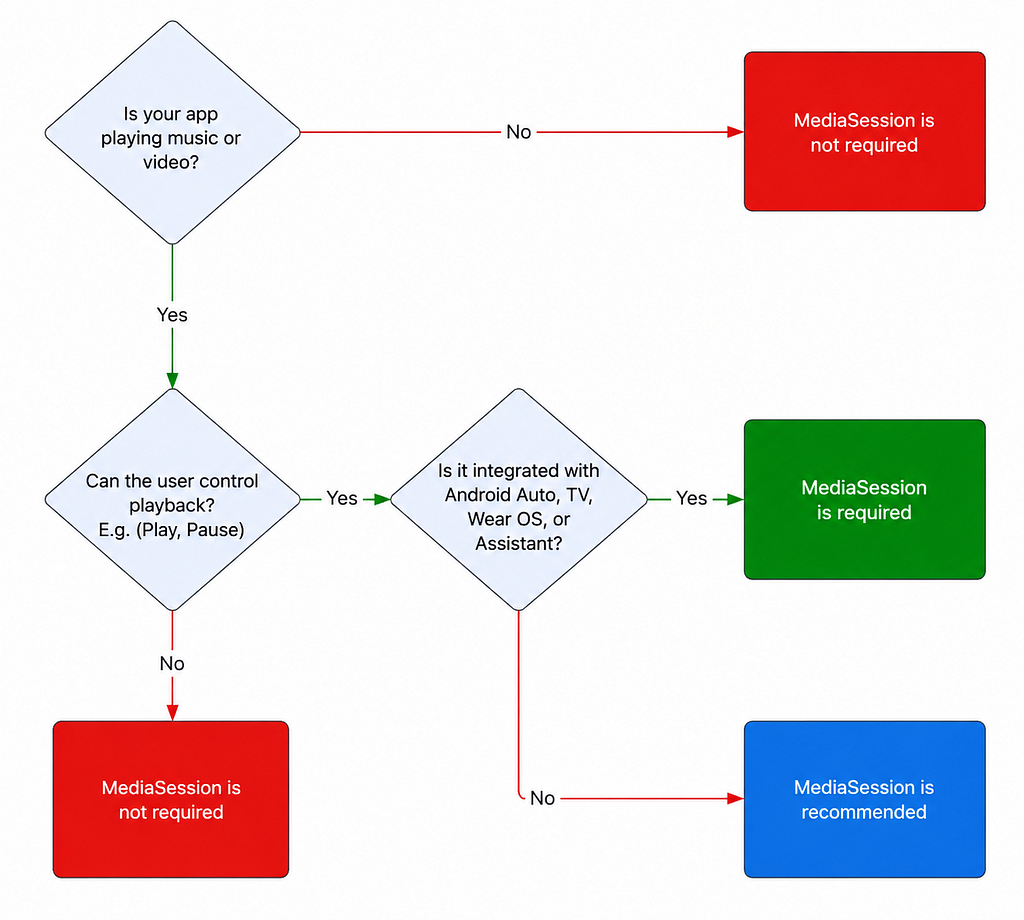
Before going deep, it is worth checking whether MediaSession belongs in your app at all. The short version: if your app plays media in the background, or you want it controlled from outside (headphones, the lock screen, a smartwatch, Android Auto, Assistant), you want a MediaSession. If it does not, you can skip it.
Where it shows up.
You have already used MediaSession without knowing it. It is what powers external control and the now-playing surface across every kind of media app.
Music
Control from headphones or a watch, now-playing on the lock screen, and steering-wheel buttons through Android Auto.
Podcasts
Skip between episodes or jump forward and back inside one, plus everything the music case offers.
Audiobooks
Pause and resume remotely, move between chapters, and show book info on the notification or lock screen.
Video
Even video apps lean on it for background and picture-in-picture playback, and for the now-playing surface.
What it actually is.
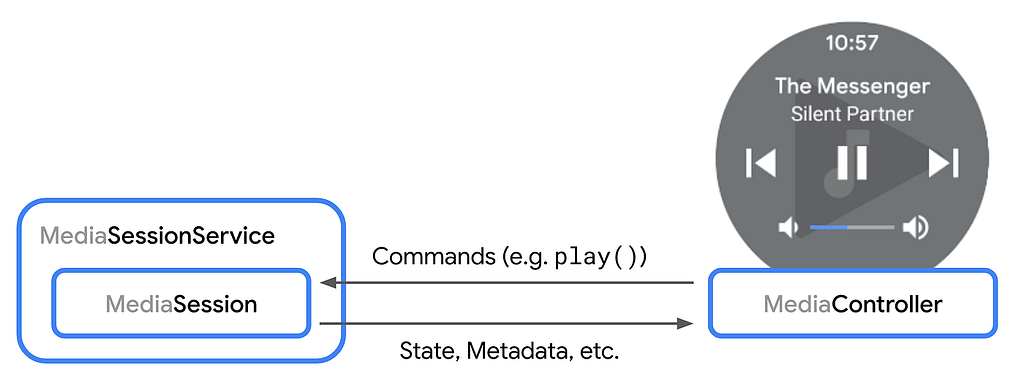
MediaSession is a Jetpack Media3 component that lets ExoPlayer be controlled from outside the app. Stop and resume with a headphone button or an Assistant command, skip forward and back, move to the next or previous item. It also notifies the outside world about player changes, like the current position or the next track in a playlist. In short, it lets you control the player remotely without touching the device.
Those external sources implement a MediaController, which handles connecting to the session and relaying command requests.
What Media3 changes
Unlike the older libraries, Media3 updates the session from the player automatically. No more hand-mapping every state into a PlaybackStateCompat. And because MediaSession and MediaController share one common Player interface, there are no fragile connector objects translating commands back and forth.
Wiring it up.
Starting from a demo app that already has ExoPlayer, adding MediaSession is only a few small changes. Build it next to the player, and release it on the same lifecycle events.
Build the session on your player.
fun initMediaSession(context: Context, player: Player): MediaSession {
    return MediaSession.Builder(context, player)
        .build()
}

// then, alongside the player, tied to the lifecycle:
mediaSession = initMediaSession(context, player!!)
Release it just like the player.
// in onPause() or onStop(), mirror how you release the player:
mediaSession?.release()
mediaSession = null
Heads up
Building the session this way supports every command by default and lets any MediaController connect. That is fine to start with. The next part shows how to lock that down.
Managing commands.
Two things are worth customizing: which commands are allowed, and what the player does when it receives one. For the first, override onConnect in a callback and accept only the commands you want. Here we allow play/pause and seek back/forward, so asking the Assistant to play at 1.25x simply will not execute.
class MediaSessionCallback : MediaSession.Callback {
    override fun onConnect(
        session: MediaSession,
        controller: MediaSession.ControllerInfo
    ): MediaSession.ConnectionResult {
        val connectionResult = super.onConnect(session, controller)
        val sessionCommands = connectionResult.availableSessionCommands
        val playerCommands = Player.Commands.Builder()
            .add(Player.COMMAND_PLAY_PAUSE)
            .add(Player.COMMAND_SEEK_BACK)
            .add(Player.COMMAND_SEEK_FORWARD)
            .build()
        return MediaSession.ConnectionResult.accept(
            sessionCommands, playerCommands
        )
    }
}

// attach it when you build the session:
MediaSession.Builder(context, player)
    .setCallback(MediaSessionCallback())
    .build()
For the second, wrap the player in a ForwardingPlayer and override the command behaviors. A real app might report each play to an analytics SDK. In the demo we just show a toast, then build the session on the forwarding player.
fun initForwardingPlayer(context: Context, player: Player): ForwardingPlayer {
    return object : ForwardingPlayer(player) {
        override fun play() {
            Toast.makeText(context, "Video played", Toast.LENGTH_LONG).show()
            super.play()
        }

        override fun pause() {
            Toast.makeText(context, "Video paused", Toast.LENGTH_LONG).show()
            super.pause()
        }
    }
}

// build the session on the forwarding player instead of the raw one:
val forwardingPlayer = initForwardingPlayer(context, player!!)
mediaSession = initMediaSession(context, forwardingPlayer)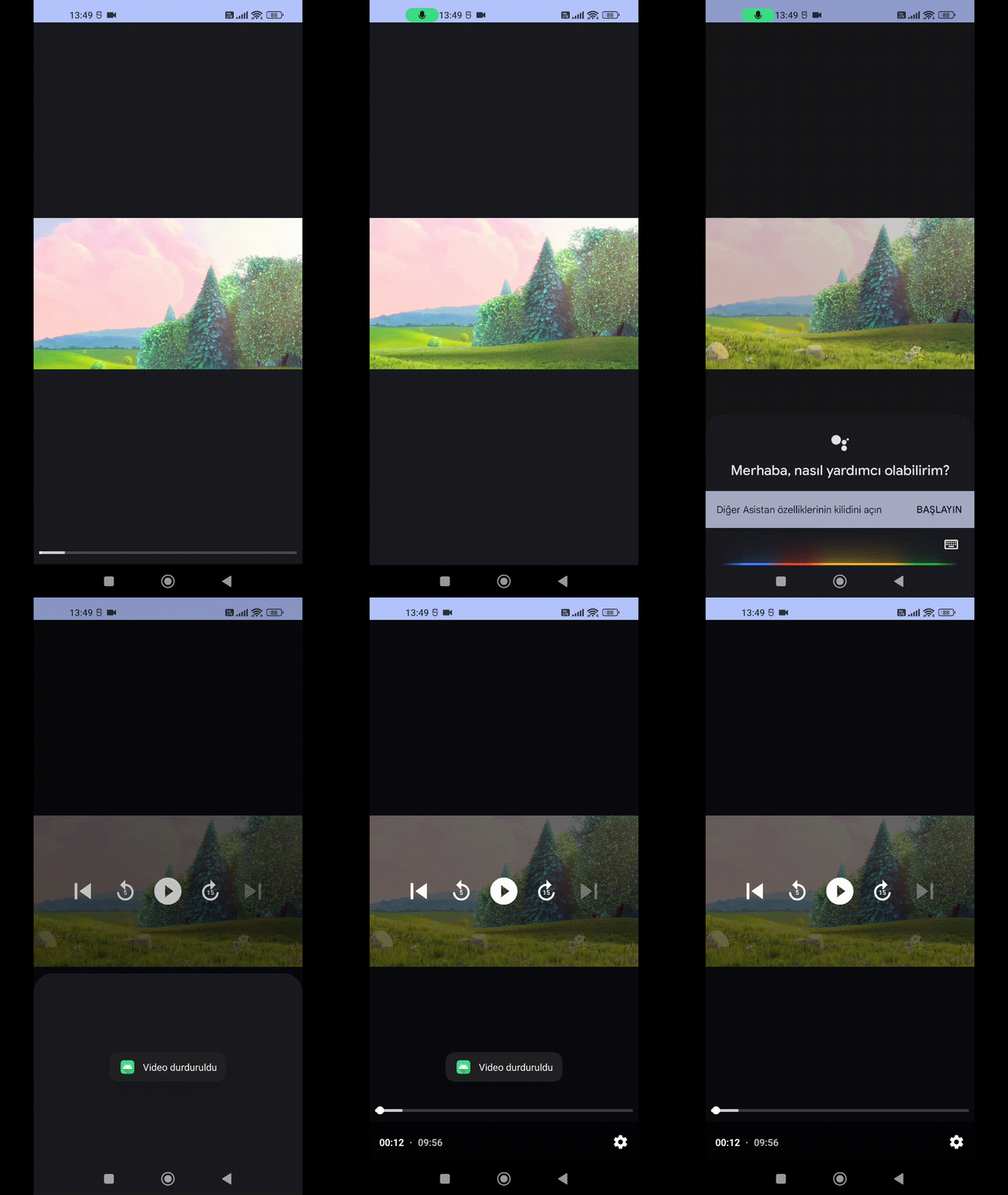
That is the whole basic setup: MediaSession is the component that lets the player in your app be controlled from external sources, and Media3 makes wiring it up genuinely small. This covered the fundamentals with a simple demo and no background playback yet. That is a topic for another article.
❦
Originally published on Medium.